




 TECHNICAL REFERENCE
Understanding Audio Phase: Problems, Prevention and Solutions During Recording and Mixing

Introduction
Phase is one of those audio concepts that is often discussed, frequently misunderstood, and sometimes blamed for problems that have little to do with phase at all. Yet when the same sound reaches two microphones, signal paths or channels at slightly different times, the resulting phase relationships can have a profound effect on what we hear.
At their most obvious, phase problems can make recordings sound thin, hollow or lacking in punch. They can weaken low frequencies, destabilise the stereo image and cause apparently important elements of a mix to disappear when it is reproduced in mono.
Understanding what causes these effects — and knowing when to leave them alone — is an important part of recording and mixing.
What is audio phase?
Sound consists of variations in air pressure travelling as waves. A microphone converts those variations into an electrical signal, and the resulting waveform represents the changes in pressure over time.
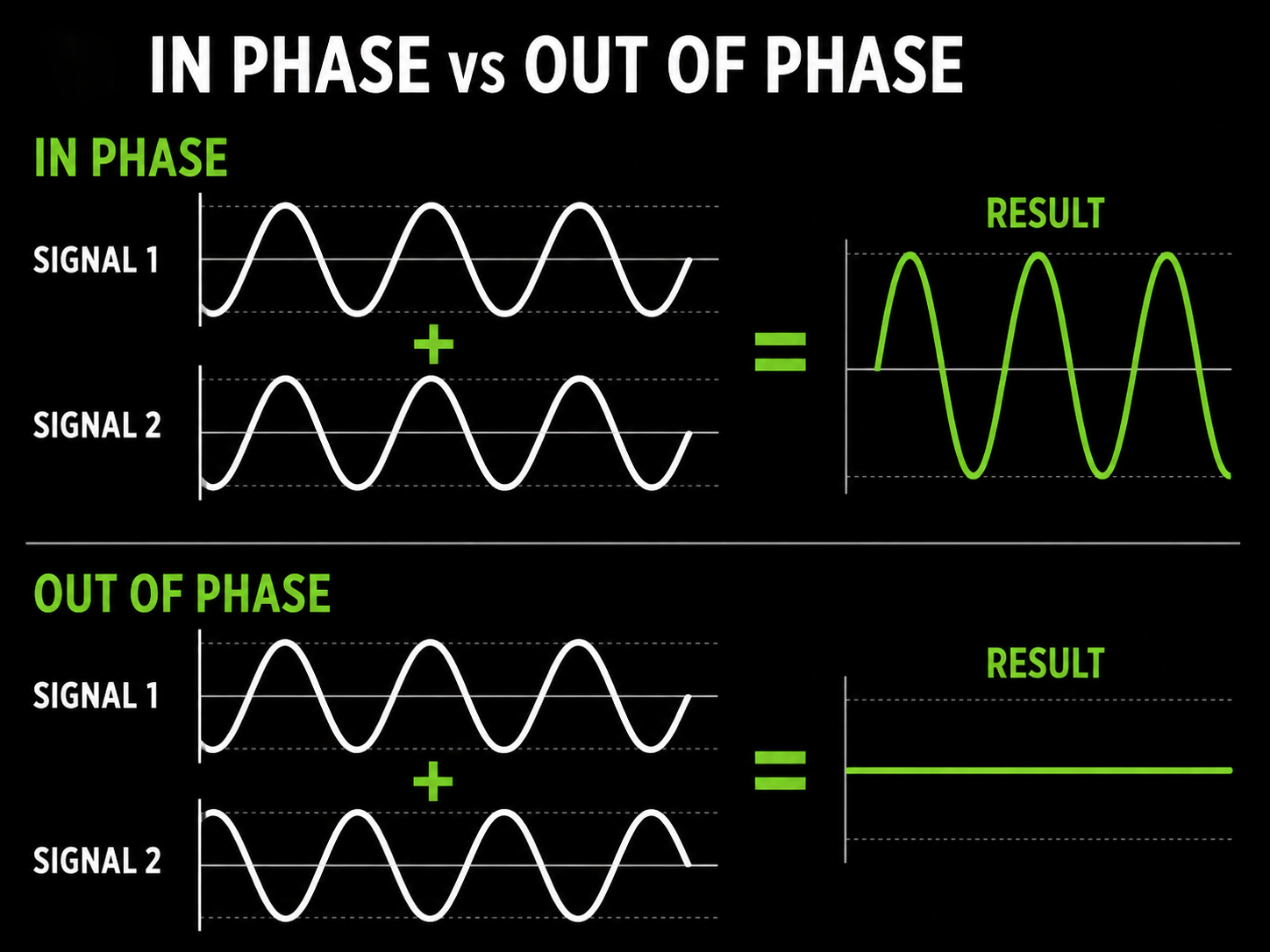
Phase describes the position of one waveform relative to another waveform carrying the same, or closely related, signal.
When two signals are closely aligned, they reinforce one another. When their timing differs, some frequencies may reinforce while others cancel. Under particular circumstances, very strong cancellation can occur.
A simple example is recording the same source with two microphones.
If both microphones receive the sound at exactly the same time, their signals will be closely aligned. But if one microphone is further from the source, the sound takes slightly longer to reach it. Even a small difference in arrival time changes the relationship between the two waveforms.
When the signals are subsequently combined, that difference can change the sound significantly.
Phase and polarity are not the same thing
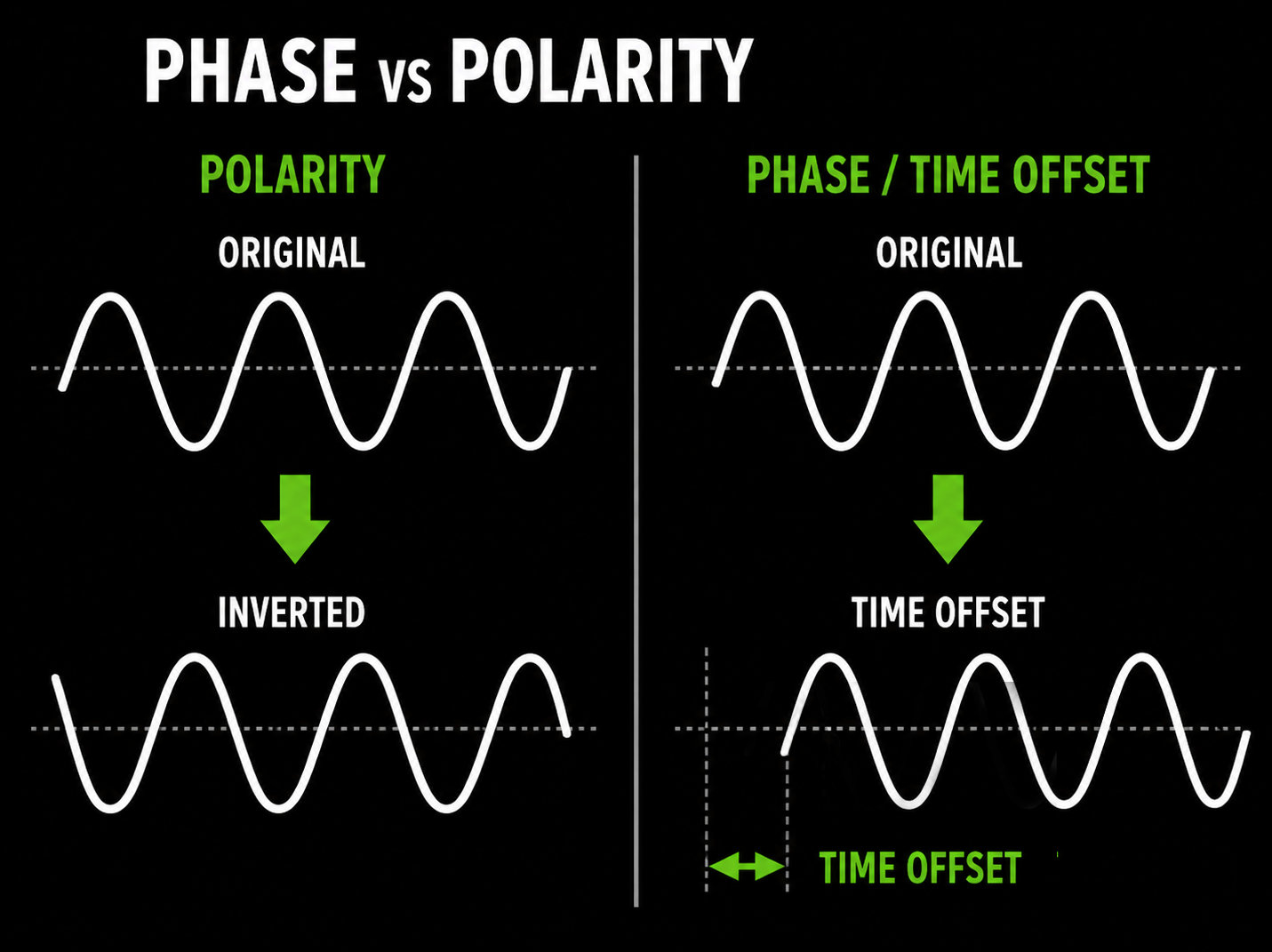
The terms phase and polarity are often used interchangeably, but they describe different things.
Polarity describes the direction of the waveform. Reversing the polarity turns the waveform upside down: positive becomes negative and negative becomes positive.
Phase, in this context, describes the timing relationship between waveforms.
Most mixing consoles and DAWs provide a polarity-reverse button, commonly identified by a Ø symbol. Reversing polarity can sometimes dramatically improve the relationship between two signals, but it is not a universal phase-correction control.
If the underlying problem is a difference in arrival time, the better solution may be to move a microphone, adjust the timing of one signal or use a dedicated alignment tool.
Why do phase problems occur?
Phase interaction becomes possible whenever the same sound reaches two or more microphones or signal paths.
Common examples include:
- Multiple microphones recording the same source
- Microphones placed at different distances
- Stereo microphone techniques
- Close and ambient microphones
- Drum kit recordings
- Multiple microphones on guitar cabinets
- DI and miked guitar or bass signals
- Direct and ambient signals
- Parallel processing
- Multiple loudspeakers or PA systems
- Reflections from walls and other surfaces
- Delays and digital processing
- Combining separately recorded versions of the same source
As the number of microphones and signal paths increases, so does the potential for interaction between them.
This does not mean that multiple microphones are undesirable. On the contrary, differences in timing, level and tonal character are fundamental to many recording techniques. The objective is not to eliminate phase differences, but to prevent them from damaging the result.
What does a phase problem sound like?
There is no single characteristic sound because the audible result depends upon the timing difference and the frequencies involved. However, there are several common warning signs.
Loss of bass
One of the most obvious symptoms is a reduction in bass or low-mid energy.
A kick drum may become thinner when an additional microphone is introduced. A bass guitar may lose weight when its DI and amplifier signals are combined. A guitar cabinet recorded with two microphones may sound excellent through either microphone individually but noticeably smaller when both are used together.
Whenever adding a second version of the same source makes the sound thinner rather than fuller, phase should be one of the things you investigate.
Reduced punch and impact
Small timing differences can also weaken transients.
This can be particularly noticeable on:
- Kick and snare drums
- Percussion
- Piano
- Acoustic guitar
- Other plucked instruments
The signals may not become dramatically quieter, but the initial impact of each note or hit can lose definition.
A hollow or nasal character
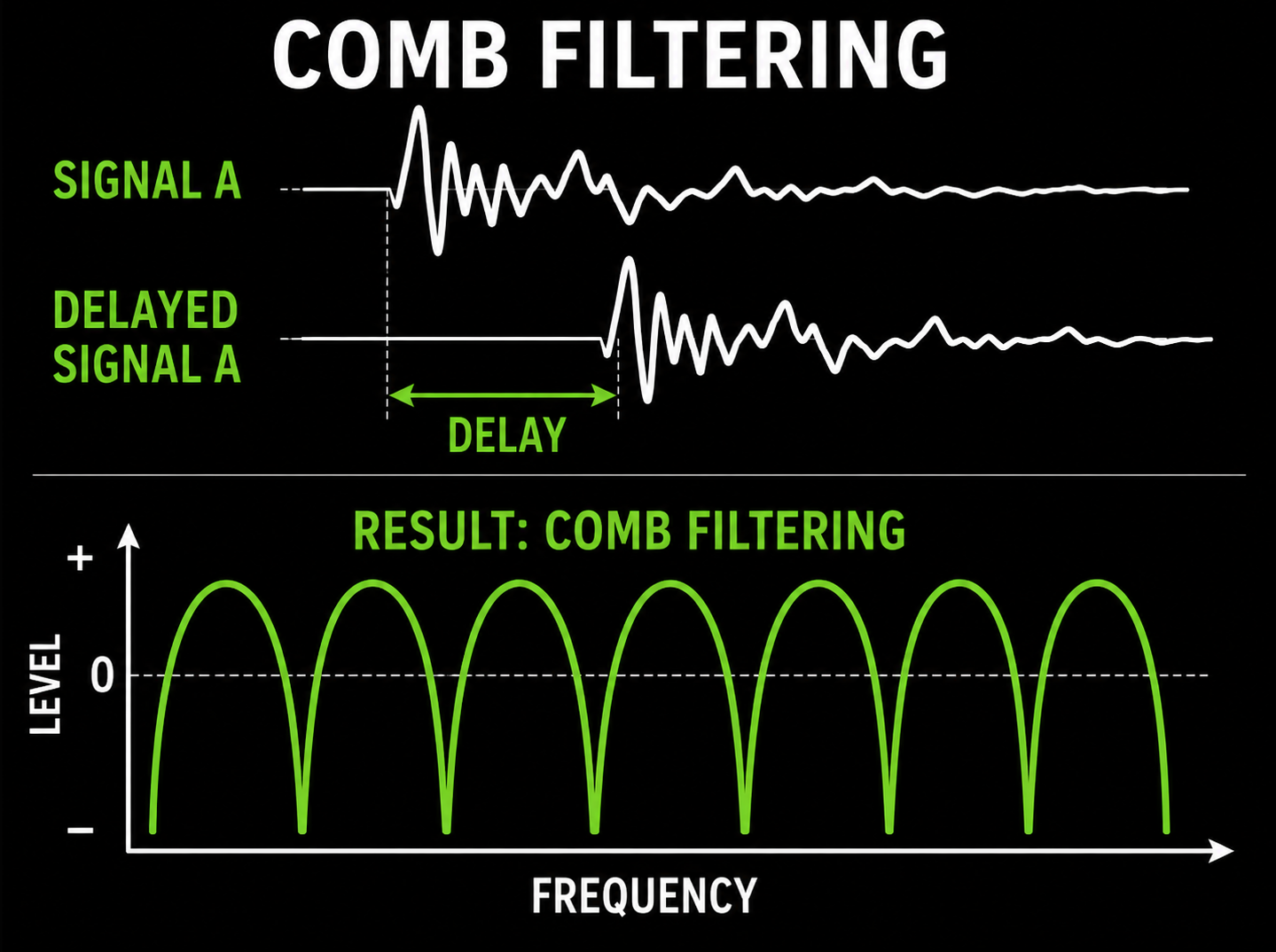
Another classic symptom is a hollow, coloured or 'inside a tube' quality.
This is often caused by comb filtering, where some frequencies reinforce while others cancel. Instead of the whole signal simply becoming quieter, a pattern of peaks and troughs is created across the frequency spectrum.
Stereo image problems
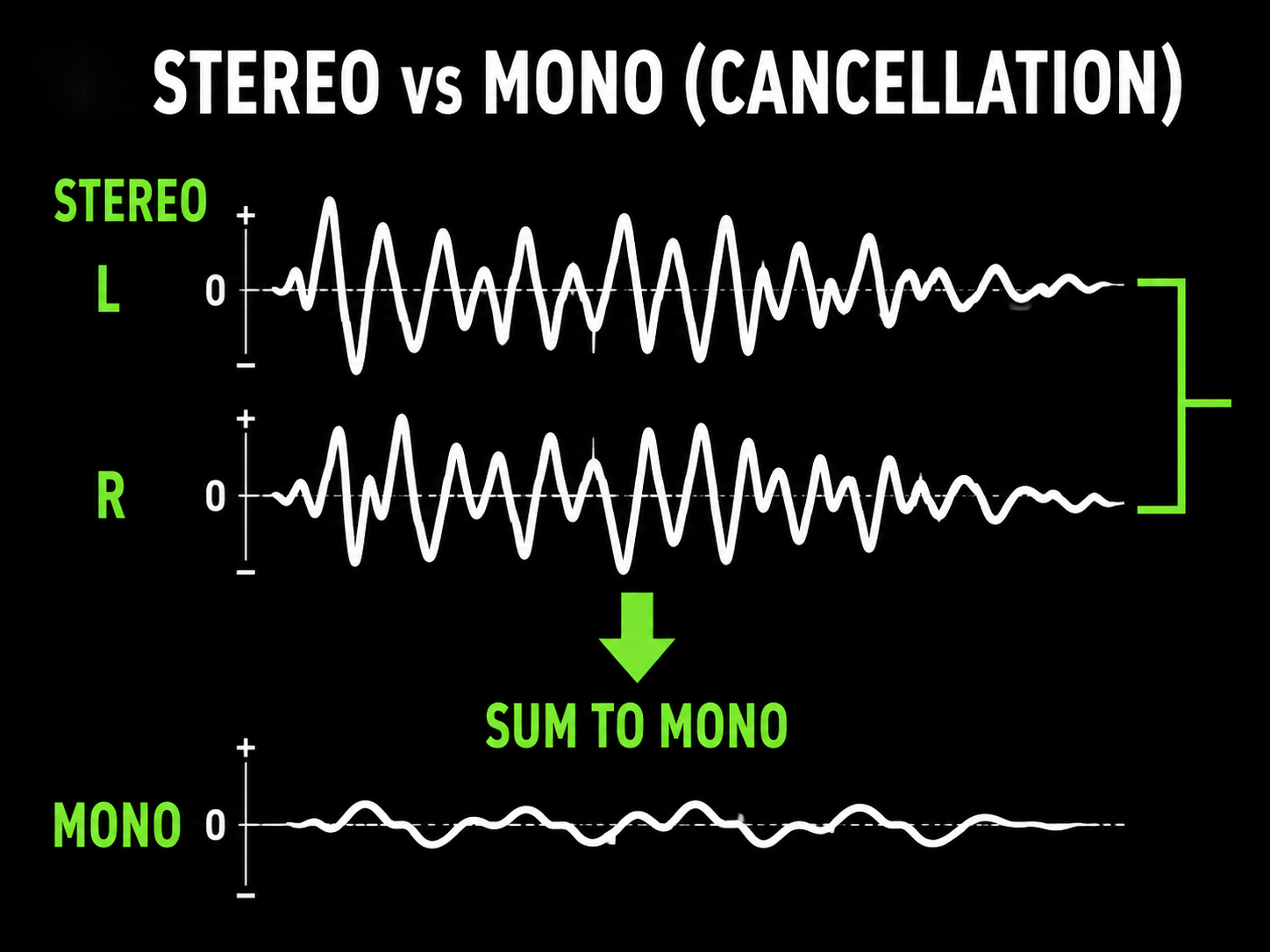
Differences between the left and right channels can also affect stereo width and mono compatibility.
A recording can sound impressively wide in stereo but become thin or lose important elements when summed to mono.
This remains important in broadcast, television, radio, streaming, live sound and other applications where material may be reproduced in mono or under less-than-ideal listening conditions.
Deal with phase while recording whenever possible
The best time to solve a phase problem is normally before the recording is committed.
Although modern editing tools can compensate for many timing differences afterwards, prevention is often easier and produces a more natural result.
Microphone placement
Microphone positioning is one of the most effective ways to control phase relationships.
Changing the distance between a microphone and its source changes the arrival time of the sound. Even moving a microphone by a few centimetres can produce a surprisingly large tonal change when its signal is combined with another microphone.
Consider a snare drum recorded with a close microphone and overhead microphones. The close microphone receives the sound almost immediately, while the snare takes longer to reach the overheads.
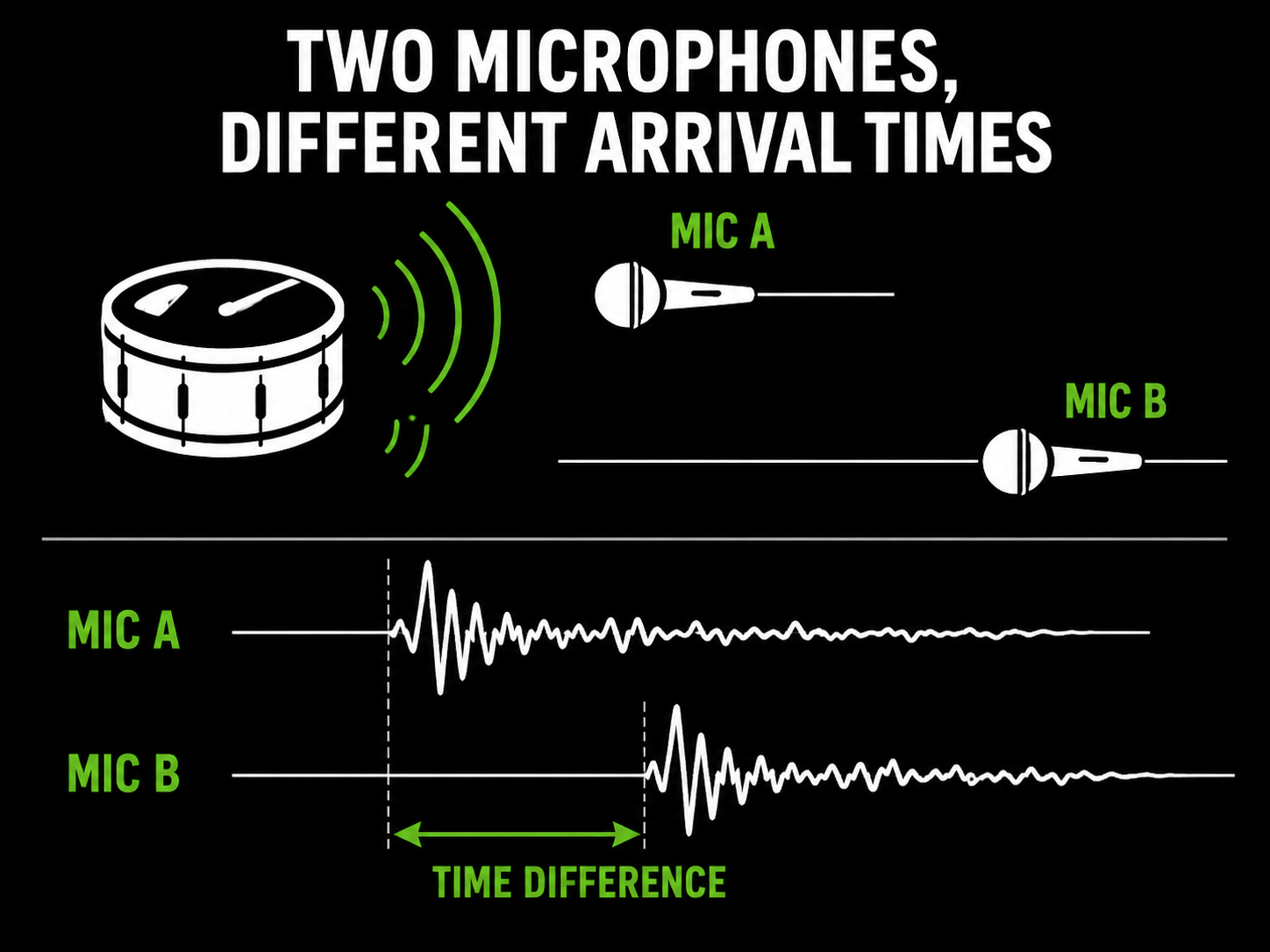
The signals therefore contain the same event at slightly different times.
That is not necessarily a problem. In fact, the timing differences between close, overhead and room microphones are an important part of the perceived size and depth of a drum recording.
The important question is whether the microphones sound good together.
The 3:1 rule
A useful starting point when working with multiple microphones is the 3:1 rule.
As a general guideline, microphones should be separated from one another by at least three times their distance from their respective sources.
For example, if a microphone is approximately 30 cm from its source, aim for around 90 cm or more between it and another microphone where circumstances allow.
The 3:1 rule is not absolute and it should never replace listening. However, it can help to reduce spill and unwanted interaction between microphones.
Check the relationship while recording
Do not wait until the mix to discover that two microphones are fighting one another.
Listen to them:
- Individually
- Together
- In stereo
- In mono
The mono check is particularly useful.
If adding a second microphone makes the source noticeably thinner, quieter or more hollow, investigate before continuing.
Try reversing polarity. If that improves the result, the polarity relationship was contributing to the problem.
If it does not, adjust the microphone position.
Moving a microphone at this stage is usually preferable to trying to repair the relationship later.
Common examples
Drum kits
Drums provide many opportunities for phase interaction because numerous microphones can capture the same events.
A snare drum, for example, may appear in:
- The close snare microphone
- Overhead microphones
- Hi-hat microphones
- Tom microphones
- Room microphones
Each receives the snare at a different time and from a different position.
The same applies to the kick drum, toms and cymbals.
However, automatically aligning every microphone is not necessarily desirable. Natural arrival-time differences help to create the size, space and character of a drum recording.
The goal is not to make every waveform visually identical.
The goal is to make the kit sound good.
Guitar Cabinets
Using two microphones on a guitar cabinet can produce a wide range of tonal colours, but tiny changes in position can have a surprisingly large effect.
If both microphones sound good individually but the guitar becomes thin when they are combined, try changing the position or distance of one microphone before reaching for EQ.
Acoustic Guitar
Similar effects can occur when recording acoustic guitar with multiple microphones.
A microphone near the 12th fret and another near the bridge are capturing different parts of the instrument from different distances.
Experimenting with placement will often produce a more coherent result than recording first and trying to correct the relationship afterwards.
Phase problems introduced during mixing
Not every phase problem originates at the microphone.
Timing and phase relationships can also change during mixing and processing.
A common example is combining a bass DI with a miked amplifier.
The DI captures the signal directly, whereas the microphone receives it after the signal has passed through the amplifier and loudspeaker and travelled through the air.
The two recordings therefore have a timing relationship that may produce cancellation when they are combined.
Similar effects can occur with:
- Parallel compression
- Parallel distortion and saturation
- Reverb mixed with dry signals
- Delays
- Multiple drum samples
- Layered bass sounds
- Multiple guitar tracks
- Synth layers
- Stereo processing
- Multiband processing
- Plug-ins that introduce latency
How to identify phase problems in a mix
Listen in Mono
Summing the mix to mono is one of the simplest and most revealing tests.
If a source becomes dramatically thinner, quieter or loses important frequencies, investigate the tracks contributing to it.
Likewise, a stereo mix that sounds enormous but collapses badly in mono may contain excessive differences between the left and right channels.
Use your ears
Listen for:
- Loss of bass
- Hollow or nasal colouration
- Reduced punch
- Weak transients
- An unstable stereo image
- Unexpected tonal changes when signals are blended
- Important elements disappearing in mono
Meters can help you diagnose a problem, but ultimately it is the audible result that matters.
Use a correlation meter
A correlation meter gives a useful indication of the relationship between the left and right channels.
Broadly speaking, a reading approaching +1 indicates strong positive correlation. A reading around 0 indicates relatively little correlation, while movement towards -1 indicates increasing out-of-phase content.
This can provide a valuable warning, particularly when assessing stereo material, but it should not be treated as an absolute measure of quality.
Some deliberately wide sounds can exhibit low or even negative correlation and still work perfectly well in context.
Look at the waveforms
When you have two recordings of the same source, zooming into their waveforms can reveal obvious timing differences.
But visual alignment should never become the goal in itself.
Two microphones may produce different-looking waveforms because they are positioned differently and are hearing different aspects of the sound.
Use waveform displays to help understand what is happening, then use your ears to decide whether anything needs to change.
Fixing phase problems in the mix
There is no universal 'fix phase' button. The right solution depends upon what caused the problem.
1. Try reversing polarity
If two signals are cancelling strongly, try reversing the polarity of one.
This can be particularly useful with:
- Multi-microphone recordings
- Kick drums
- Snare drums
- Bass DI and amplifier combinations
- Multiple microphones on guitar cabinets
If the combined sound immediately becomes fuller and more coherent, polarity was contributing to the problem.
2. Adjust the timing
If one signal is arriving later than another, a small timing adjustment may improve their relationship.
This can be achieved using:
- Track delay
- Clip editing
- Plug-in delay
- Sample-level editing
- Dedicated alignment tools
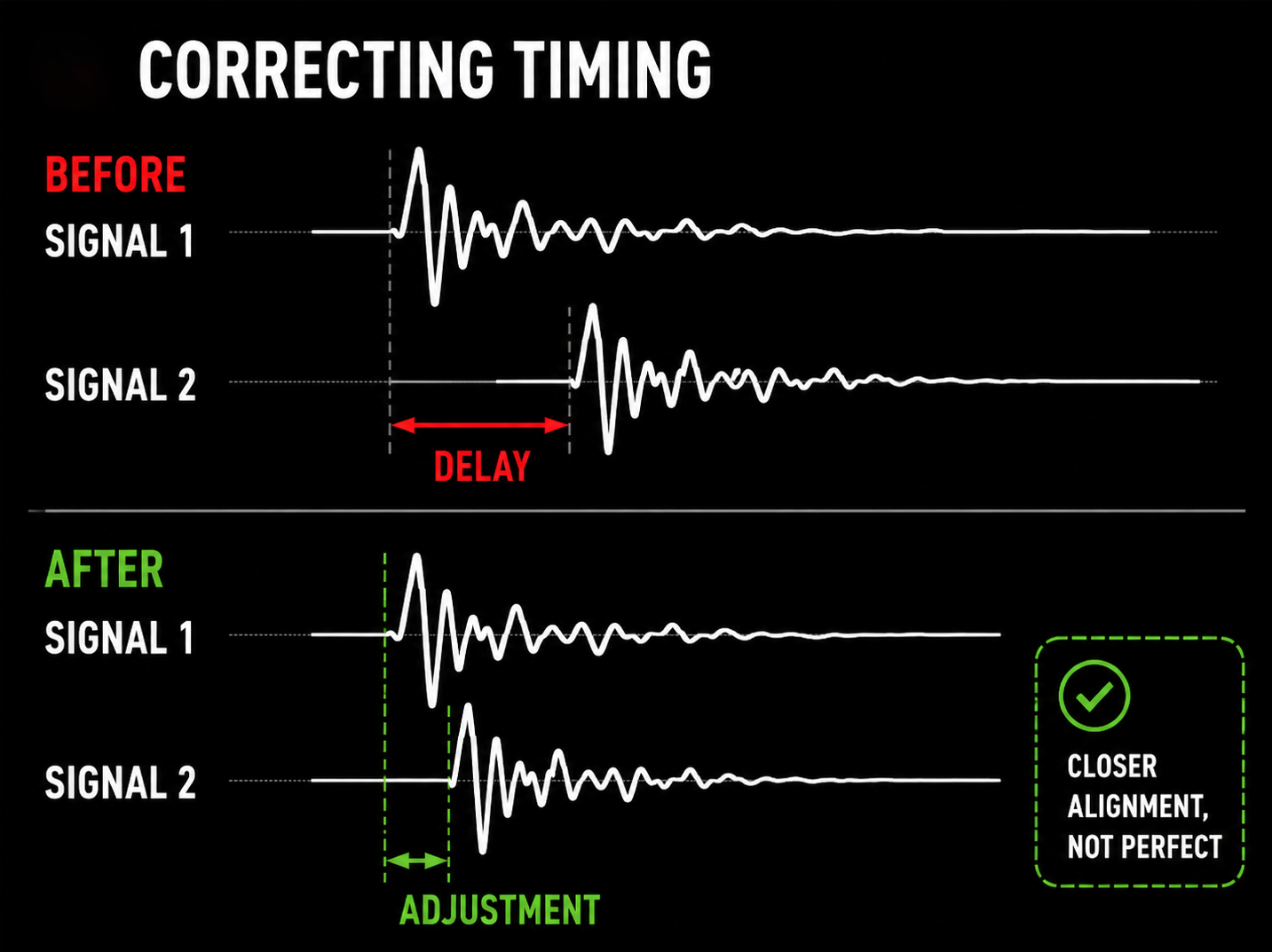
For example, a bass DI and miked amplifier can sometimes be made more coherent by advancing or delaying one signal slightly.
However, resist the temptation to align everything perfectly simply because the DAW makes this possible.
Perfect visual alignment can sometimes remove the depth and character that made the recording interesting in the first place.
3. Move the microphone
If you are still recording, physical adjustment is often the best solution.
Try moving the microphone:
- Closer to the source
- Further away
- Left or right
- Towards or away from the centre of the source
- Slightly off-axis
Then listen again.
A movement of only a few centimetres may produce a greater improvement than extensive processing later.
4. Use EQ where appropriate
Phase cancellation is frequency-dependent, so some parts of the spectrum may be affected more strongly than others.
EQ can sometimes reduce the audible consequences by decreasing the amount of overlapping energy between two signals.
For example, filtering one of two microphones may create a cleaner combined sound.
EQ does not correct the underlying timing relationship, but it can make that relationship less problematic.
5. Use fewer microphones or layers
Sometimes the simplest solution is the best one.
If two microphones sound better individually than they do together, ask whether you actually need both.
Likewise, if several layered sounds are fighting one another, removing one may improve the result more effectively than trying to engineer around the problem.
One excellent recording is often preferable to several signals competing with each other.
Phase and parallel processing
Parallel processing deserves particular attention because it deliberately combines an original signal with a processed version of itself.
For this to work predictably, the two paths need to maintain an appropriate timing relationship.
Some processors introduce latency or alter the phase response of the signal, potentially creating cancellation when the processed and unprocessed paths are recombined.
Modern DAWs generally provide plug-in delay compensation, but unusual behaviour can still be worth investigating in complex signal chains involving:
- Parallel compression
- Parallel distortion
- Parallel saturation
- EQ
- Multiband processing
- Linear-phase processing
- Look-ahead processors
If a parallel effect changes the source in an unexpected way when its level is increased, timing and phase interaction are worth checking.
Linear-phase EQ is not a universal solution
Linear-phase EQ is sometimes presented as a solution to phase problems, but this can be misleading.
A linear-phase equaliser is designed to maintain a more consistent phase relationship between frequencies while applying EQ. It does not somehow repair timing differences between microphones or recordings.
Linear-phase processing may also introduce latency and, depending on the implementation and settings, pre-ringing.
For many everyday mixing tasks, a conventional minimum-phase EQ may therefore be the more appropriate choice.
The important thing is to understand the problem you are trying to solve rather than choosing a processor simply because it carries the words linear phase.
Phase and stereo width
Many stereo widening techniques work by manipulating the differences between the left and right channels.
The result can sound impressive in stereo, but it may also become much less effective — or even partially cancel — when reproduced in mono.
This is especially relevant in:
- Broadcast
- Television
- Radio
- Live sound
- Corporate AV
- Mobile playback
- Streaming
- Public-address systems
For this reason, stereo processing should always be checked in both stereo and mono.
A practical phase-checking workflow
During recording
1. Plan the microphone setup
Identify which microphones are likely to capture the same sources.
2. Position microphones carefully
Consider distance and arrival time as well as tonal character.
3. Listen to each microphone individually
Make sure every microphone contributes something useful on its own.
4. Listen to the microphones together
Does the combination improve the sound, or make it smaller?
5. Check polarity
Try reversing polarity where appropriate.
6. Check in mono
Listen for losses in bass, punch or clarity.
7. Make physical changes before recording
If moving a microphone solves the problem, do that rather than relying upon later correction.
During mixing
1. Identify the affected sources
Look for multiple microphones, parallel signal paths or duplicate versions of the same sound.
2. Listen to the tracks individually and together
Establish what changes when they are combined.
3. Check polarity
Try reversing one signal and compare the result.
4. Check timing
Experiment with small adjustments where appropriate.
5. Check the mix in mono
Listen for cancellation and tonal changes.
6. Use a correlation meter
Treat it as a diagnostic aid rather than a pass/fail test.
7. Try EQ
Reduce problematic overlap where necessary.
8. Remove unnecessary layers
If two signals are fighting one another, decide whether both are genuinely contributing.
9. Compare with the original
Make sure your correction has actually improved the sound rather than merely changed it.
Don't become obsessed with perfect alignment
Perhaps the most important thing to understand about phase is that phase differences are not inherently bad.
Record sound in a real acoustic space and different microphones will inevitably receive it at different times. Stereo microphone techniques deliberately use timing and level differences to create width, localisation and depth.
The natural timing differences between the close, overhead and room microphones on a drum kit can be part of what makes the recording sound like a drum kit in a real space.
If every microphone were perfectly time-aligned, the result could actually become less natural.
So the objective is not to eliminate phase differences.
It is to control unwanted phase interaction.
Sometimes the relationship between two microphones is exactly what gives a recording its character.
Conclusion
Phase is an important part of professional recording and mixing. Unwanted phase interaction can contribute to thin bass, reduced punch, hollow colouration, unstable stereo imaging and poor mono compatibility.
Wherever possible, deal with potential problems during recording. Good microphone placement, sensible microphone selection and regular mono checks can prevent many issues before they become embedded in the production.
During mixing, polarity reversal, timing adjustments, EQ, appropriate signal processing and careful track selection can all help when problems remain.
Most importantly, treat phase as a listening problem, not simply as a technical measurement.
Meters, waveform displays and analysis tools can help you understand what is happening, but the goal is not to make every waveform line up perfectly.
The right phase relationship is the one that gives the production the clarity, punch, depth and tonal balance it needs.